-
English

-
हिंदी

-
বাংলা

-
中文

-
español

-
- Forex Indicators
- Economic Calendar
- Trade Signals
- Sign Up
- Sign In

Back
doublema_crossoverdif_ea.mq4
# doublema_crossoverdif_ea - MT4 Expert Advisor | Automated Forex Trading System
Overview
doublema_crossoverdif_ea is a professional MetaTrader 4 Expert Advisor (EA) designed for automated forex trading. This powerful trading robot executes trades automatically based on predefined strategies and technical indicators, allowing traders to take advantage of market opportunities 24/7 without manual intervention.
Key Features:
- Fully automated trading system
- Compatible with MetaTrader 4 platform
- Advanced risk management tools
- Professional trading algorithms
Trading Strategy & Indicators
This Expert Advisor utilizes advanced technical analysis through the following indicators:
Price Action & Technical Analysis
This Expert Advisor employs sophisticated price action analysis and technical indicators to identify high-probability trading setups. The system analyzes market conditions in real-time to make informed trading decisions.
How It Works:
The EA continuously monitors the market, analyzing price movements and indicator signals. When specific conditions are met, the system automatically opens trades according to the predefined strategy. The algorithm is designed to identify optimal entry and exit points while managing risk effectively.
Risk Management Features
Stop Loss Protection
YES - Enabled - The EA includes stop loss functionality to limit potential losses on each trade. This essential risk management feature helps protect your trading capital.
Take Profit Targets
YES - Enabled - Take profit levels are automatically set to secure profits when price reaches predetermined targets. This helps lock in gains and maintain consistent profitability.
Trailing Stop
YES - Enabled - Advanced trailing stop functionality allows the EA to protect profits by automatically adjusting stop loss levels as trades move in your favor. This maximizes profit potential while securing gains.
Money Management
YES - Advanced Money Management Enabled
This Expert Advisor includes sophisticated money management features that help optimize position sizing and risk control. The system can:
- Dynamic Position Sizing: Automatically adjusts lot sizes based on account balance and risk parameters
- Risk Percentage Control: Allows you to set the percentage of account equity risked per trade
- Account Protection: Monitors account equity and free margin to prevent over-leveraging
- Flexible Lot Calculation: Supports both fixed and dynamic lot sizing strategies
Benefits:
- Better capital preservation
- Consistent risk exposure
- Adapts to account growth
- Professional risk management
Martingale Strategy
WARNING - Martingale Strategy Detected
This Expert Advisor employs a martingale or lot multiplication strategy. This means:
How It Works:
- After a losing trade, the EA may increase the lot size for the next trade
- The goal is to recover previous losses with larger position sizes
- This strategy can amplify both profits and losses
Important Considerations:
- WARNING - High Risk: Martingale strategies can lead to significant drawdowns
- MONEY - Capital Requirements: Requires substantial account balance to withstand losing streaks
- CHART - Market Conditions: Works best in trending markets with clear direction
- TARGET - Risk Management: Always use proper stop loss and account management
Recommendations:
- Start with a demo account to test the strategy
- Use only risk capital you can afford to lose
- Monitor performance closely
- Consider disabling martingale if drawdowns become excessive
- Set maximum lot size limits
Entry & Exit Signals
Entry Conditions
The EA analyzes multiple market factors to identify optimal entry points:
- Technical Indicator Signals: Monitors indicator crossovers, divergences, and momentum
- Price Action Patterns: Identifies chart patterns and price movements
- Market Conditions: Assesses volatility, trend strength, and market structure
- Risk/Reward Ratios: Evaluates potential profit versus risk before entering
Exit Strategy
The system uses multiple exit methods:
- Take Profit Targets: Closes trades when profit targets are reached
- Stop Loss Protection: Exits losing trades at predetermined levels
- Trailing Stops: Protects profits by following price movements
- Signal-Based Exits: Closes positions when exit conditions are met
Configuration & Setup
Key Parameters
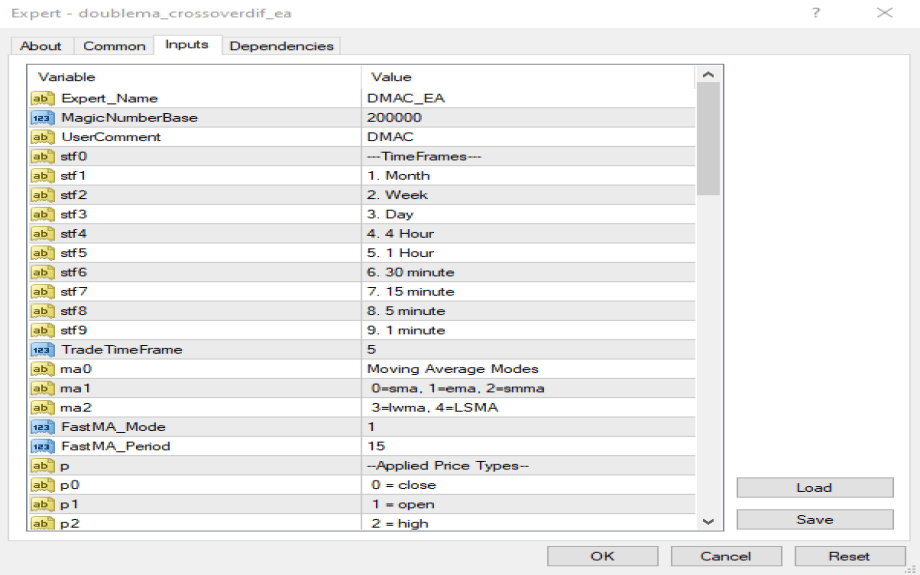
Configure the EA through MetaTrader 4's input parameters. Key settings typically include:
- Lot size or risk percentage
- Stop loss and take profit levels
- Indicator parameters
- Trading hours and filters
Installation Steps
1. Download the EA file (doublema_crossoverdif_ea.mq4)
2. Copy to your MetaTrader 4 Experts folder
3. Restart MetaTrader 4 or refresh Navigator
4. Attach to a chart (any timeframe)
5. Configure parameters according to your trading preferences
6. Enable AutoTrading in MT4
7. Monitor performance and adjust as needed
Recommended Settings
- Account Size: Minimum 500-1000 USD for proper risk management
- Broker: ECN or STP broker with tight spreads
- Currency Pairs: Test on major pairs first (EUR/USD, GBP/USD, USD/JPY)
- Timeframe: Use the recommended timeframe for best results
- VPS: Consider using a VPS for 24/7 operation
Performance & Optimization
Backtesting
Before live trading, always:
- YES Test on historical data
- YES Verify strategy performance
- YES Check maximum drawdown
- YES Analyze win rate and profit factor
- YES Test different market conditions
Optimization Tips
- Parameter Tuning: Adjust indicator periods and risk settings
- Market Conditions: Test in trending and ranging markets
- Pair Selection: Some pairs may perform better than others
- Timeframe Analysis: Different timeframes may yield different results
- Risk Settings: Find optimal risk/reward balance
Important Notes & Disclaimer
WARNING - Risk Warning: Trading forex involves substantial risk of loss. Past performance does not guarantee future results.
CHART - Testing Required: Always test EAs on a demo account before live trading.
MONEY - Capital Management: Never risk more than you can afford to lose.
CHART - Market Conditions: EA performance varies with market conditions. Monitor and adjust as needed.
CHART - Continuous Monitoring: Even automated systems require periodic review and optimization.
SEO Keywords & Tags
Primary Keywords: MT4 Expert Advisor, Forex EA, Automated Trading, MetaTrader 4, Trading Robot
Secondary Keywords: MT4 Expert Advisor, Forex EA, Automated Trading, MetaTrader 4, Trading Robot, Money Management, Martingale Strategy
Related Terms: Algorithmic Trading, Forex Automation, Currency Trading, Expert Advisor Strategy, MT4 Indicators, Risk Management, Money Management, Forex Robot
Technical Specifications
- Platform: MetaTrader 4
- File Type: .mq4 (MQL4 Source Code)
- Trading Mode: Automated
- Compatibility: MT4 Build 600+
- License: Check product license terms
*This documentation was automatically generated and enhanced for better readability and SEO optimization. Always review the EA code and test thoroughly before live trading.*
Last Updated: 2026-02-21
| No additional details. |


